
Use this guide to create a Location User in techSHIP.
This procedure covers the common user information required to create the account and save it.
 | For detailed conceptual information, advanced configuration, and checking the required permissions to perform this procedure, refer to techSHIP User Permissions Structure [Information]. If you need to confirm which user-management capabilities are available for your subscription, refer to techSHIP Specifications Sheet [Information]. | |
| | ||
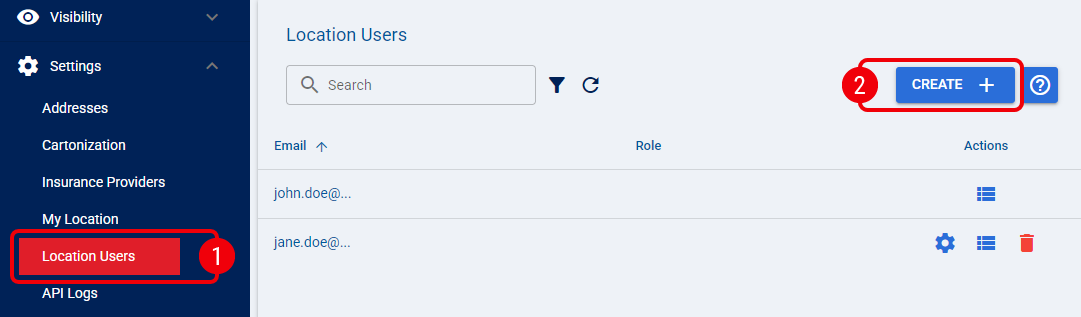
 | From Settings, select Location Users. |
 | Click Create to open the Create User dialog. |
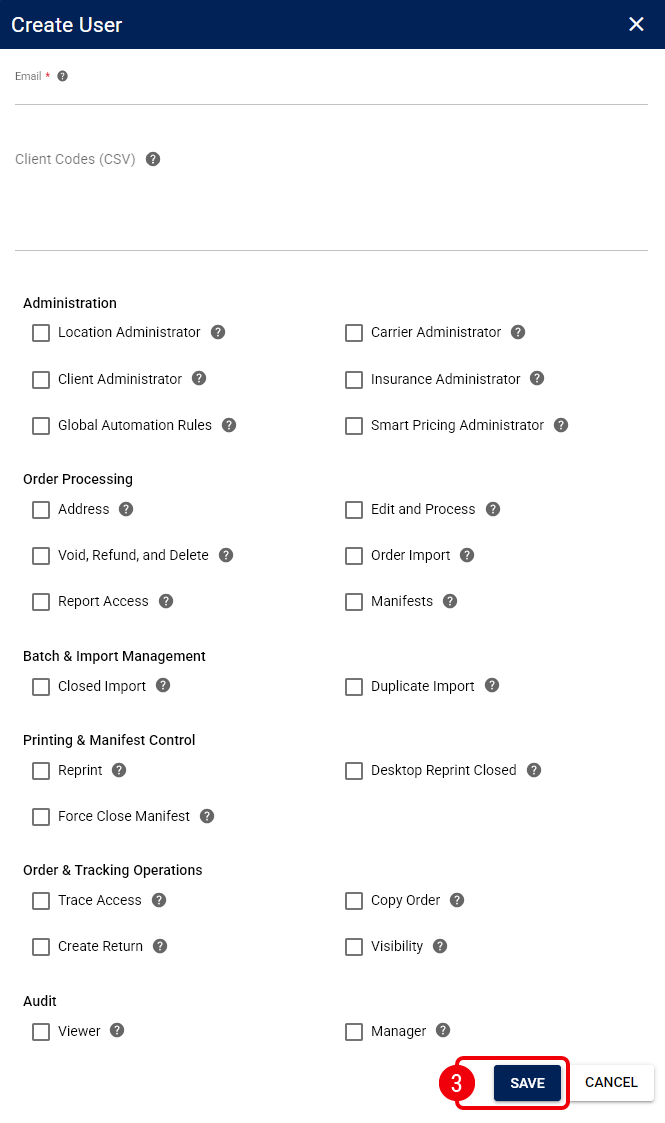
 | Enter the required information and select Save: |
- Email: Enter the email address the user uses to sign in to techSHIP.
- Client Codes (CSV): When your techSHIP subscription allows it, limit the user's client access. Refer to How to Configure Client Access for a Location User [Step-by-Step Guide] for more information.
- Permission controls: Assign the permissions the user needs. Refer to How to Assign Permissions to a Location User [Step-by-Step Guide] for more information.
The Location User is created in techSHIP.