
Order Management Rules (OMR) allow you to reference specific data points to create Conditions or define Actions. While standard fields are available in the dropdown menus, you can use Custom Expressions to target raw data, unmapped service codes, or temporary values assigned during runtime.
This article explains the structure, syntax, and compatibility of the available data objects.
 NOTE: Before proceeding, be sure to read and understand: What's New in Order Management Rules (OMR) for Rule Sets in techSHIP [Guide].
This article is divided into the following sections:
- Enabling Custom Expressions
- Data Source Classifications
- Native Objects (techSHIP Data)
- Custom Objects (User-Defined & Raw Data)
- Virtual Variables (virtual)
- Integrated System Raw Data (WmsData)
- Custom Fields (customfields)
- Syntax & Compatibility Matrix
- Rule Sets
- Clients & Client Templates
- Markup Profiles
I. ENABLING CUSTOM EXPRESSIONS
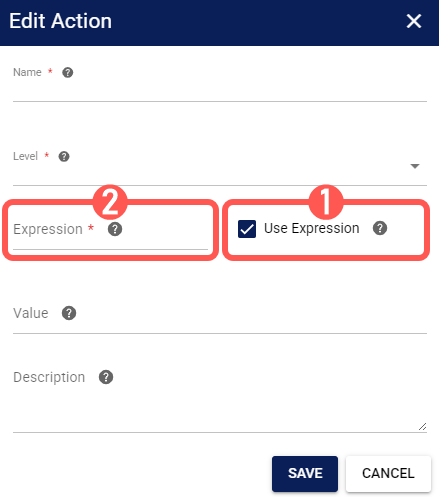
While editing an OMR, both Conditions and Actions provide a standard list of fields in the Field dropdown menu. However, if you need to reference a value that is not listed (such as a specific custom field or an unmapped service code), you must use the Use Expression feature:
1. Check Use Expression while editing the desired step.
2. Enter the targeted variable in the Expression field.
NOTE: Expressions allow you to fetch data directly from techSHIP objects or the Integrated System's raw data.For detailed information on the available functions you can use, refer to: Order Management Rules (OMR) Available Functions (Expressions) [Information].
NOTE: This screenshot is provided for illustrative purposes only. Minor UI differences may exist depending on the OMR version and the step being configured.
II. DATA SOURCE CLASSIFICATIONS
Before writing an expression, you must identify the Source of your data. OMR classifies variables into three types:
Native Objects (techSHIP Data):
Standard, processed data structures created by techSHIP (e.g., Order, Package, Line). These are the most common fields used in rules.
Custom Objects:
Raw Data:
Unmapped data or custom fields received directly from the Integrated System (e.g., WMS, ERP, etc.)
User-Defined:
Variables managed explicitly by the Location configuration or the Rule execution itself. This includes Virtual Variables (temporary storage) and Location Custom Fields.
III. NATIVE OBJECTS (techSHIP DATA)
These objects represent the standard entities within techSHIP:
- Order: The main shipment record containing billing, shipping, and carrier information.
- Package: Attributes specific to a single box within the shipment.
- Line: Specific SKU or Item information within a package or order.
 WARNING: The Line object is supported only for the Actions listed in the compatibility table below.
Use the standard "Dot Notation" referencing the Source and the Field Name:
| ACTION | CONDITION | |
| Definition | {Source.FieldName} | @([Source.FieldName]) |
| Example | {Order.ShipToName} | @([Order.ShipToName]) |
 NOTE: Field Dictionaries:
 - For a list of Order fields, see: Using Order Data Variables in OMR [Information].
- For a list of Package fields, see: Using Package Level Variables in OMR [Information].
- For a list of Line fields, see: Using Line Level Variables in OMR [Information].
IV. CUSTOM OBJECTS (USER-DEFINED & RAW DATA)
These objects allow you to interact with data outside the standard techSHIP structure, such as temporary variables or the Integrated System raw data.
These variables often use a prefix:Name format for Actions or specific wrapper objects for Conditions.
i. Virtual Variables (virtual)
Virtual variables are temporary placeholders used to store values during the rule execution. They are not saved unless mapped to a real field later:
| SCOPE | ACTION | CONDITION | |
| Definition | Order | virtual:VariableName | @([CustomFields.VariableName]) |
| Package | virtual:VariableName | @([PackageCustomFields.VariableName]) | |
| Line | virtual:VariableName | @([LineCustomFields.VariableName]) | |
| Example | Order | virtual:Score | @([CustomFields.Score]) |
| Package | virtual:MaxType | @([PackageCustomFields.MaxType]) | |
| Line | virtual:IsFixed | @([LineCustomFields.IsFixed]) |
ii. Integrated System Raw Data (WmsData)
Used to read data exactly as it was sent by the Integrated System. This applies to both the Order level and the Line level:
WARNING: Raw Data support depends entirely on the connection type and the payload sent by the Integrated System. Field availability may change without notice if the integration is updated.
| SCOPE | CONDITION | |
| Definition | Order | @([WmsData.RawFieldName]) |
| Line | @([LineWmsData.RawFieldName]) | |
| Example | Order | @([WmsData.WMSCustomField1]) |
| Line | @([LineWmsData.WMSLineCustomField1]) |
iii. Custom Fields (customfields)
Used to map data to or from the Location's specific Custom Fields configuration:
| SCOPE | ACTION | CONDITION | |
| Definition | Order | customfields:CustomMappingName | @([CustomFields.CustomMappingName]) |
| Package | customfields:CustomMappingName | @([PackageCustomFields.CustomMappingName]) | |
| Line | customfields:CustomMappingName | @([LineCustomFields.CustomMappingName]) | |
| Example | Order | customfields:CustomMappingField1 | @([CustomFields.CustomMappingField1]) |
| Package | customfields:CustomMappingField1 | @([PackageCustomFields.PackageCustomMappingField1]) | |
| Line | customfields:CustomMappingField1 | @([LineCustomFields.LineCustomMappingField1]) |
V. SYNTAX AND COMPATIBILITY MATRIX
Not all objects are available in every OMR module. Use the following matrix to identify the correct syntax and availability for your context.
WARNING: Incorrect syntax or capitalization will cause the rule to fail or the condition to evaluate as False. Always verify the exact field name before saving.
i. Rule Sets
| SYNTAX | |||
| DATA SOURCE | SCOPE | ACTION | CONDITION |
| techSHIP Object | Order | {Order.FieldName} | @([Order.FieldName]) |
| Package | {Package.FieldName} | @([Shipment.FieldName]) | |
| Line | {Line.FieldName} | @([FieldName]) | |
| Raw Data | Order | customfields:FieldName | @([WmsData.FieldName]) |
| Package | N/A | N/A | |
| Line | customfields:FieldName | @([LineWmsData.FieldName]) | |
| User-Defined | Order | virtual:FieldName | @([CustomFields.FieldName]) |
| Package | virtual:FieldName | @([PackageCustomFields.FieldName]) | |
| Line | virtual:FieldName | @([LineCustomFields.FieldName]) | |
ii. Clients & Client Templates
| SYNTAX | |||
| DATA SOURCE | SCOPE | ACTION | CONDITION |
| techSHIP Object | Order | {Order.FieldName} | @([Order.FieldName]) |
| Package | N/A | @([Shipment.FieldName]) | |
| Line | {Line.FieldName} | @([FieldName]) | |
| Raw Data | Order | customfields:FieldName | @([WmsData.FieldName]) |
| Package | N/A | N/A | |
| Line | customfields:FieldName | @([LineWmsData.FieldName]) | |
| User-Defined | Order | virtual:FieldName | @([CustomFields.FieldName]) |
| Package | N/A | N/A | |
| Line | virtual:FieldName | @([LineCustomFields.FieldName]) | |
iii. Markup Profiles
| SYNTAX | |||
| DATA SOURCE | SCOPE | CONDITION | |
| techSHIP Object | Order | @([Order.FieldName]) | |
| Package | N/A | ||
| Line | N/A | ||
| Raw Data | Order | @([WmsData.FieldName]) | |
| Package | N/A | ||
| Line | N/A | ||
| User-Defined | Order | N/A | |
| Package | N/A | ||
| Line | N/A | ||