
![Article 1: Midland Onboarding Requirements and Configuration Guides [Information]](https://s3.amazonaws.com/cdn.freshdesk.com/data/helpdesk/attachments/production/96804815/original/09VBUo14zVrZ7P3XOYSoWXIqqrVjGFCUUQ.png?1779474501) | ![Article 2: Reference Data: Midland Baseline Account Fields [Guide]](https://s3.amazonaws.com/cdn.freshdesk.com/data/helpdesk/attachments/production/96804740/original/A-sKSzmZ_Vj4x4q6VoUBEk-gtdTDnv2kuQ.png?1779473989) | ![Article 3: Reference Data: Midland Client (Billing) Account Fields [Guide]](https://s3.amazonaws.com/cdn.freshdesk.com/data/helpdesk/attachments/production/96805395/original/_J10u70kSFBTHPSpib4jtXfeu4C3mm54wg.png?1779476680) |
| Onboarding and Configuration | Baseline Account | (Billing) Account |
 You are here You are here |
This reference lists the carrier-specific Midland Baseline Account fields used in techSHIP.
Use it together with the linked Baseline Account setup steps: the setup guide covers the shared configuration flow, while this article defines the confirmed field values, field behavior, and carrier-specific configuration details.
 |
For a complete overview of supported carriers and related setup guides, refer to techSHIP supported Carriers - Master List [Guides List].
|
 | Review Midland Onboarding Requirements and Configuration Guides [Information] before configuring the Baseline Account so required credentials and account settings are confirmed. |
TABLE OF CONTENTS
Adding a Baseline Account
Follow the UI Navigation steps in How to Add a Carrier Baseline Account [Step-by-Step guide], using the carrier-specific values provided in this guide.
Carrier-Specific Instructions
Carrier Tab
The Carrier tab contains the Baseline Account fields used to define the carrier connection and Midland-specific baseline configuration.
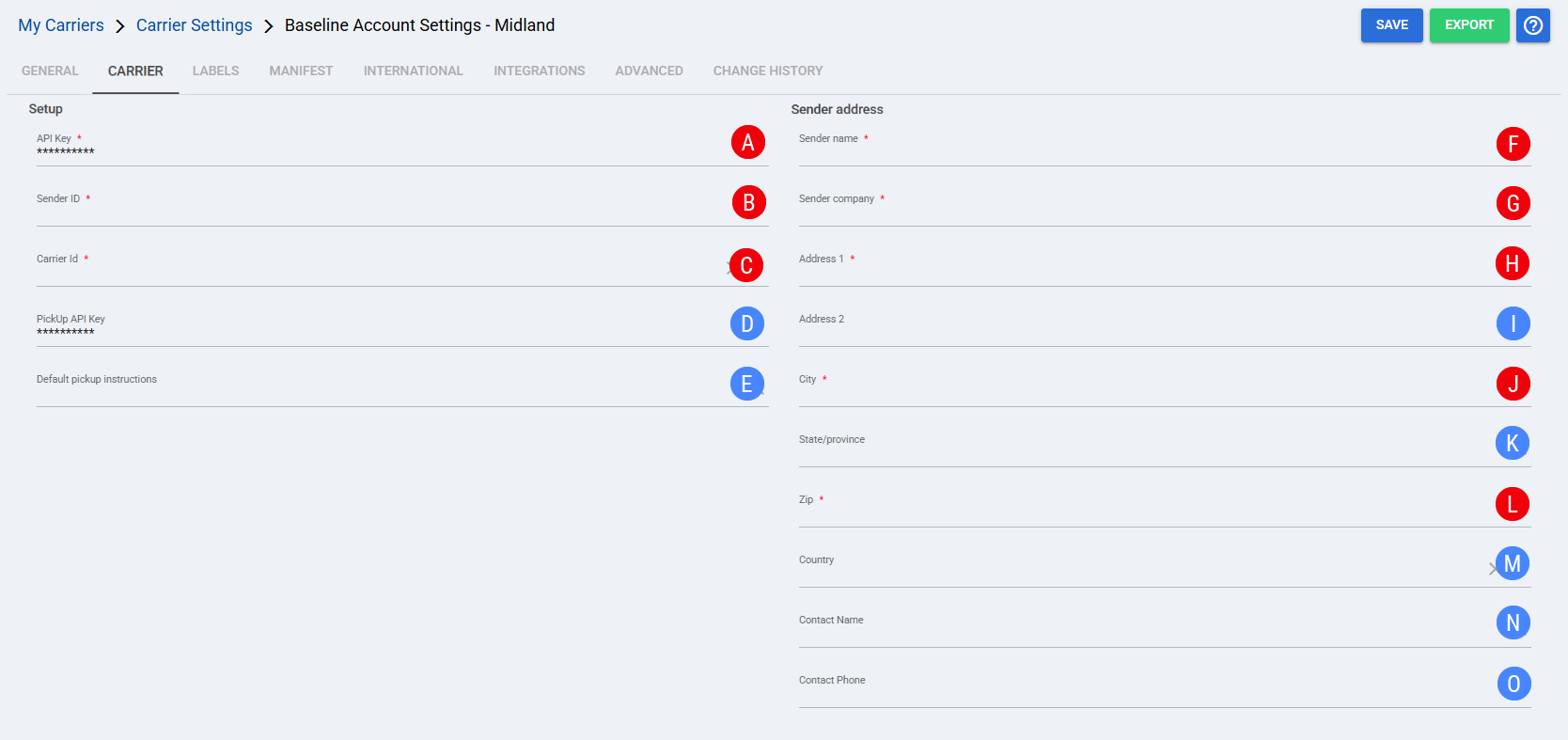
 | API Key: Enter the API Key provided by Midland to authenticate the Baseline Account connection. |
 | Sender ID: Enter the Sender ID string provided by Midland. This value identifies the sender for Midland requests. |
 | Carrier Id: Select the shipment type used by this Baseline Account. For LTL shipments, select Midland LTL. |
 | PickUp API Key: Enter the standalone Pickup API Key provided by Midland for pickup requests. |
 | Default pickup instructions: Enter pickup instructions to send with pickup requests when needed. |
 | Sender name: Enter the sender name used for the Midland sender address. |
 | Sender company: Enter the sender company used for the Midland sender address. |
 | Address 1: Enter the primary sender address line used for the Midland sender address. |
 | Address 2: Enter the secondary sender address line when needed. |
 | City: Enter the city used for the Midland sender address. |
 | State/province: Enter the state or province used for the Midland sender address. |
 | Zip: Enter the zip or postal code used for the Midland sender address. |
 | Country: Select the country used for the Midland sender address. |
 | Contact Name: Enter the sender contact name used for Midland requests. |
 | Contact Phone: Enter the sender contact phone used for Midland requests. |
| Select Save before continuing so the configured settings are applied. |
Finalizing the Setup
After the Midland Baseline Account is configured and saved, continue with Reference Data: Midland Client (Billing) Account Fields [Guide].
Go to  | ||
![Article 1: Midland Onboarding Requirements and Configuration Guides [Information]](https://s3.amazonaws.com/cdn.freshdesk.com/data/helpdesk/attachments/production/96804995/original/8TBA5Gx5zMbNVuxpBfz-CdrCvI4APxv9oQ.png?1779475304) | ![Article 2: Reference Data: Midland Baseline Account Fields [Guide]](https://s3.amazonaws.com/cdn.freshdesk.com/data/helpdesk/attachments/production/96805147/original/W85CGdQ10tusn215or-ihmIcZ_i6NOpE0Q.png?1779475851) | ![Article 3: Reference Data: Midland Client (Billing) Account Fields [Guide]](https://s3.amazonaws.com/cdn.freshdesk.com/data/helpdesk/attachments/production/96804742/original/bHFYZzIg1p3n6eidaRLAM0zP1uVKzHY4sw.png?1779473999) |
| Onboarding and Configuration | Baseline Account | (Billing) Account |