
Finding tracking numbers allows you to view their details to learn more about the location of goods, enhance customer satisfaction, resolve shipment issues, and ensure regulatory compliance.
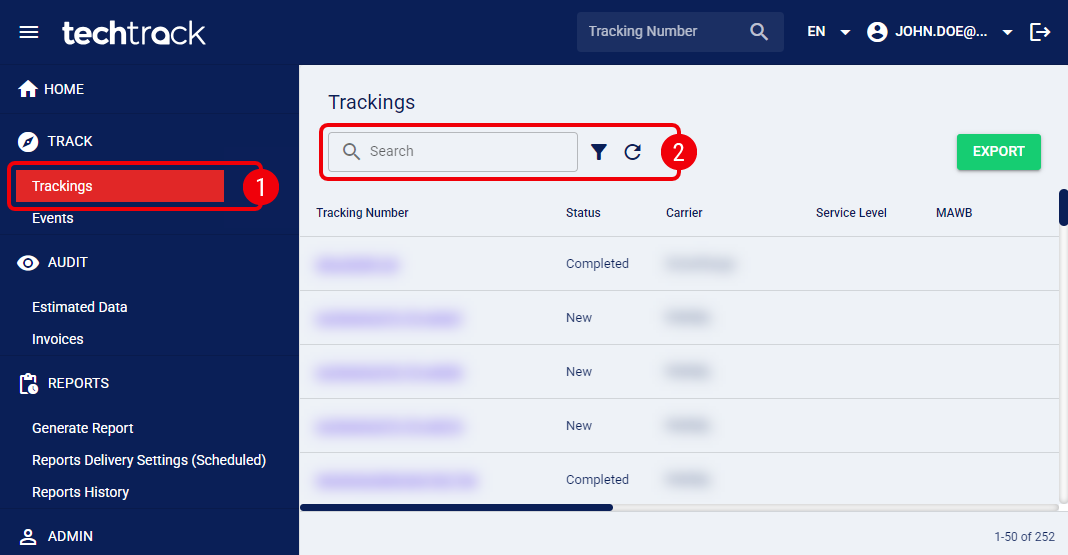
 | Click Trackings from the left menu under the Track section. |
 | Filter the tracking numbers using the Search bar (to quickly search by Tracking Number or Master Tracking Number) or click on the filter icon to apply an Advanced Filter. |
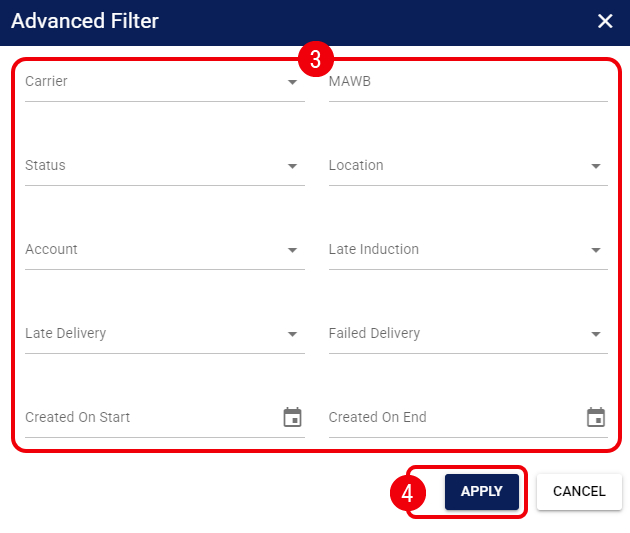
 | Modify any of the following fields as needed: |
Carrier: Select the carrier responsible for the shipping service.
MAWB: Enter the Master Air WayBill (MAWB) number for air freight shipments.
Status: Select the current status of the shipment.
Location: Filter by the specific location associated with the shipment.
Account: Select the specific Account associated with the shipments.
Late Induction: Select Yes to filter for shipments that were not inducted by the carrier within the expected timeframe.
Late Delivery: Select Yes to filter for shipments that have exceeded their Expected Delivery Date (EDD).
Failed Delivery: Select Yes to filter for shipments where a delivery attempt was unsuccessful.
Created On Start / Created On End: Select a date range to filter shipments based on when they were created in the system.
 |
For more information on these fields, see: Introducing Shipment Visibility and Tracking [Guide].
|
 | Press Apply to review the filtered tracking numbers. |
Once you identify the desired shipment, click the Tracking Number to open it.