
The Insights section in techSHIP provides powerful, interactive dashboards for shipment tracking, performance monitoring, and cost analysis. This article shows you how to access them.
 NOTE: This feature requires special users permissions, as detailed in: techSHIP User Permissions Structure [Information].
 NOTE: The dashboards available in your menu depend on your current subscription plan and configuration. Additionally, new dashboards may be released periodically. For a complete catalog of all available dashboards and their definitions, see: Insights Dashboards Master List [Guides List].
To access a dashboard:
1. Click Insights in the left menu to expand the category.
2. Click the desired dashboard name.
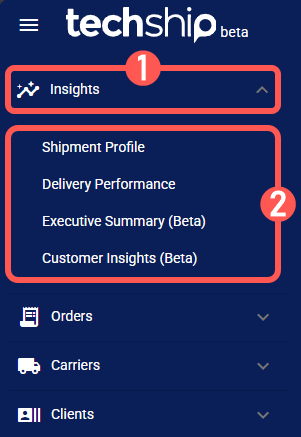
NOTE: The Shipment Profile dashboard is displayed by default upon login.
Once you access a dashboard, you can start analyzing your data. For guidance, see:
- Insights Dashboards Master List [Guides List], which provides an overview of all available dashboards and their main purpose.
- How to Use the Insights Dashboards [Guide], which explains how to filter, view details, and export data.