
The Sales Insight dashboard focuses on analyzing sales performance and order trends. It helps you understand revenue drivers, Sales Channels' effectiveness, geographic order distribution, and how fulfillment operations support sales. This article provides detailed information on its displayed data.
 | For a list of available dashboards and instructions to access them, see the Insights Dashboards Master List [Guides List]. To learn how to filter, view details, and export data from this dashboard, refer to How to Use the Insights Dashboards [Guide]. | |
| | ||
TABLE OF CONTENTS
Purpose
Use this dashboard for sales analysis and strategic planning by:
- Analyzing order values across different sales channels.
- Visualizing the geographic concentration of your orders.
- Monitoring backorder trends and their potential impact on sales.
- Correlating fulfillment performance with sales outcomes.
ASPECT | ORGANIZATIONAL INSIGHT |
Primary Focus | Sales performance and order trend analysis. |
Best For | Understanding sales patterns, channel effectiveness, and geographic distribution. |
Highlighted Metrics | - Average Order Value - Order Geographic Distribution - Backorders - Industry Benchmarking |
Typical Questions | - Which sales channel generates the highest order value? - Where are most of our customers located? - Which products are most frequently on backorder? |
Typical Users | - Executives - Sales Managers - Marketing Teams |
Components
Key components:
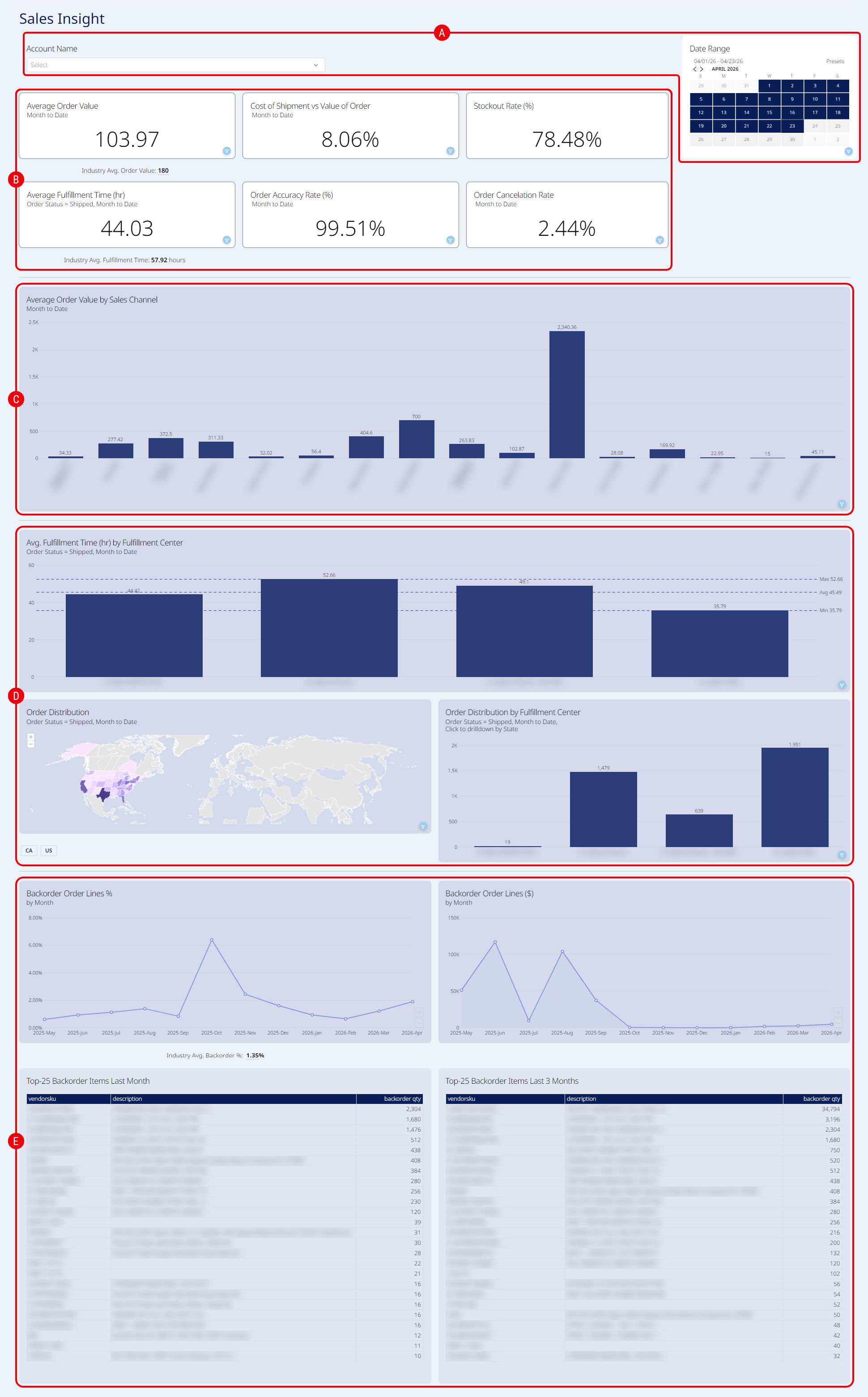
 | Embedded Filters: Filter by Account Name, Date Range, or a combination. |
 | KPI Summary: Displays Key Performance Indicators (KPIs) for the organization. This section includes: |
| The Industry Avg. metrics displayed beneath select KPIs represent the global aggregate data across all active techOMS accounts. These benchmarks calculate data over a rolling 90-day period. | |
| | ||
- Average Order Value: The total revenue divided by the total number of orders. This calculation strictly excludes taxes, orders in a Draft status, and orders in a Canceled status. This tile also displays the Industry Avg. Order Value.
- Cost of Shipment vs Value of Order: The total shipping cost (order charge) divided by the total revenue (subtotal).
- Stockout Rate (%): The percentage of SKUs that have an available quantity of zero or less, calculated against the total number of tracked inventory items.
- Average Fulfillment Time (hr): The average time (in hours) between an order's creation date and its Shipped status date. This tile includes the Industry Avg. Fulfillment Time.
- Order Accuracy Rate (%): The percentage of orders with a Shipped status compared to the total orders (those Shipped plus Short Shipped).
- Order Cancelation Rate: The percentage of canceled orders relative to the total number of orders, strictly excluding any orders currently in a Draft status.
 | Sales Performance Analysis: A chart displaying the average order value (total revenue divided by total orders) grouped by sales channel. |
 | Order Distribution and Fulfillment: Visualizations showing where orders originate and how they are fulfilled. This section includes: |
- Avg. Fulfillment Time (hr) by Fulfillment Center: The average fulfillment time (in hours) grouped by fulfillment center.
- Order Distribution: A dynamic map showing order density. Click to drill down geographically (state/province level limited to Canada and the United States). Dedicated buttons below the map act as quick country filters.
- Order Distribution by Fulfillment Center: A chart showing the total number of orders processed by each fulfillment center.
 | Backorder Analysis: Provides insights into backordered items. This section includes: |
- Backorder Order Lines %: The percentage of total order lines that currently have a Backorder status. The chart also displays the Industry Avg. Backorder %, which calculates the global average for the previous three months across all active techOMS accounts.
- Backorder Order Lines ($): The total revenue (subtotal) of all order lines that currently have a 'BackDorder' status.
- Top-25 Backorder Items Last Month: A table of SKUs ranked by the highest quantity on backorder, based on orders from the previous full month.
- Top-25 Backorder Items Last 3 Months: A table of items ranked by backorder status, based on orders from the last three months (including the current month).