
The Item Profitability Report provides a detailed financial analysis of your product performance. It helps you identify high-margin items and underperforming SKUs to optimize pricing and inventory strategies.
This article explains the specific metrics and visualizations available in the Item Profitability Report dashboard.
 |
For a list of available dashboards and instructions to access them, see Insights Dashboards Master List [Guides List]. To learn how to filter, view details, and export data from this dashboard, refer to: How to Use the Insights Dashboards [Guide].
|
TABLE OF CONTENTS
Purpose
Use this dashboard for granular financial analysis and merchandising decisions by:
Tracking revenue and profit margins at the SKU level.
Identifying top-performing products and loss-leaders.
Comparing the cost of goods sold against generated revenue.
The table below summarizes its key aspects:
FEATURE | SHIPMENT PERFORMANCE |
| Primary Focus | SKU-level profitability and margin analysis. |
| Best For | Merchandising decisions, pricing strategy optimization, and inventory rationalization. |
| Highlighted Metrics |
|
| Typical Questions |
|
| Typical Users |
|
Components
Key components:
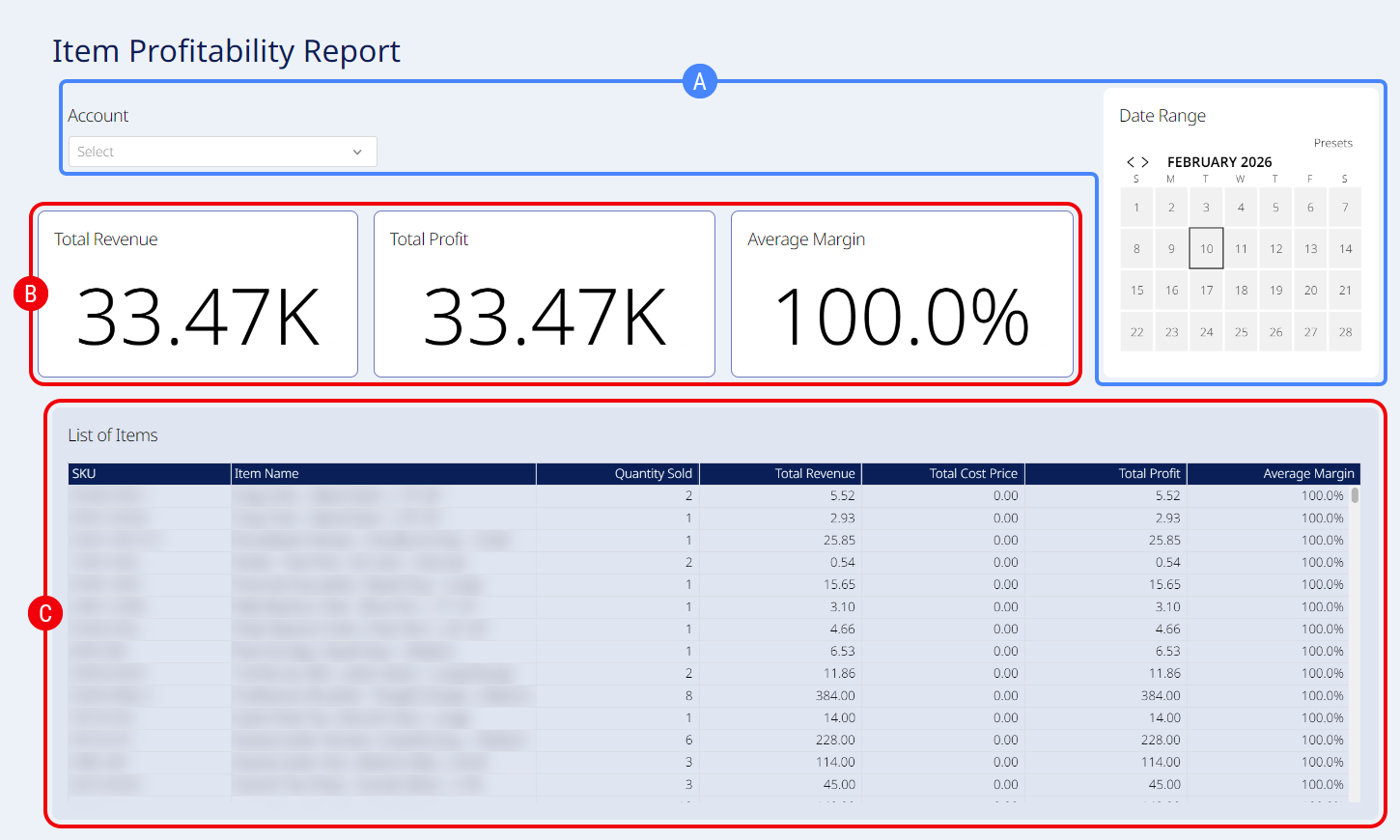
 | Embedded Filters: Filter by Account, Date Range, or a combination. |
 | Summary: Displays high-level Key Performance Indicators (KPIs) regarding the overall financial health of the selected data set. This section includes: |
Total Revenue: The sum of all revenue generated from item sales within the selected period (calculated as Quantity Sold × Retail Price).
Total Profit: The total revenue minus the total costs incurred (calculated as Revenue - Total Cost).
Average Margin: The mean profit percentage across all items, providing a quick view of overall efficiency.
 | Item Performance Details: Provides a row-by-row breakdown of financial performance for each specific product variant. This section includes: |
SKU: The SKU for the specific product variant.
Item Name: The descriptive name of the product.
Quantity Sold: The total number of units sold during the selected period.
Total Revenue: The total sales value generated by this specific item.
Total Cost Price: The total cost of goods sold for this item (calculated as Quantity × Cost Price).
Total Profit: The net earnings for this item after deducting costs.
Average Margin: The profit margin percentage specific to this item, helping identify if the product is meeting financial targets.