
This guide explains how to add and configure a Metropolitan Warehouse & Delivery Client (Billing) Account.
A Client (Billing) Account assigns a carrier connection to a specific Client and defines how that carrier behaves for that Client.
 | For a complete overview of supported carriers and related setup guides, refer to techSHIP supported Carriers - Master List [Guides List]. |
TABLE OF CONTENTS
Prerequisites
Before adding a (Billing) Account, ensure that:
- The Client Profile has been created. See: How to create a Client profile [Step-by-Step guide].
- This setup uses a Baseline Account as the foundation. To create and configure one specific to this carrier, see: How to Add a Metropolitan Warehouse & Delivery Baseline Account [Guide].
- Follow the configuration steps as described in How to Add a Client (Billing) Account [Step-by-Step guide] using the values provided below.
Carrier-Specific Instructions
The Carrier tab contains the Metropolitan Warehouse & Delivery-specific configuration used to define operational behavior for this Client (Billing) Account.
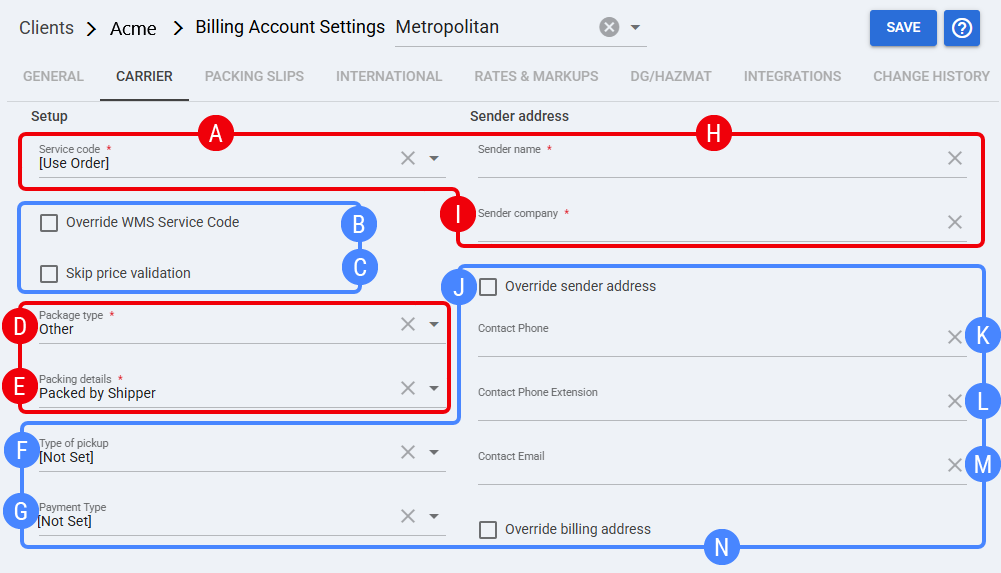
 | Service code: Default service selection for this billing account. If set to [Use Order], the order’s service selection is used. Service code can auto-populate depending on order context. |
 | Override WMS Service Code: When enabled, forces techSHIP to override the inbound/WMS service mapping and use the billing account/service selection rules. |
 | Skip price validation: Optional validation bypass. Use only if your workflow requires ignoring price validation checks for this client. |
 | Package type: Mandatory package classification used for operational handling and carrier request formatting. |
 | Packing details: Mandatory packing method/descriptor used by the carrier integration (client-level behavior). |
 | Type of pickup: Optional field to specify pickup building type for this client account (use when your operation needs it). |
 | Payment Type: Optional. Defines client-level billing/payment behavior for shipments when applicable. |
 | Sender name: Mandatory shipper contact/name used on documents. Configure as a single field in techSHIP unless your internal standard requires splitting. |
 | Sender company: Mandatory company/legal name used as shipper for this client account. |
 | Override sender address: Overrides shipper address details with the values configured in this billing account, replacing inbound/external values with the inputs from fields that display only when this option is checked:
|
 | Contact Phone: Optional. Phone number used for carrier contact/dispatch if required. |
 | Contact Phone Extension: Optional extension associated with Contact Phone. |
 | Contact Email: Optional email address used for notifications/dispatch contact. |
 | Override billing address: When enabled, overrides billing address details for this client account, replacing inbound/external values. |
 | To enable carrier-specific settings —and before continuing—, press Save. |
Next Steps
You can now use this account to ship through Metropolitan Warehouse & Delivery.