
This guide explains how to configure Saia REST-specific settings in the Carrier tab of an Order.
A Carrier Tab configuration defines transaction-level behavior that applies only to the selected Order. These settings are enforced by the carrier and may vary depending on the selected service, shipment type, and accessorial configuration.
 |
For a complete overview of supported carriers and related setup guides, refer to techSHIP supported Carriers - Master List [Guides List].
|
TABLE OF CONTENTS
Prerequisites
Before configuring the Order's Carrier tab, ensure that:
A Saia REST Client (Billing) Account has been created. See: How to Add a Saia REST Client (Billing) Account [Guide].
Follow the configuration steps as described in: 05 - How to edit an order’s information - [Step-by-Step guide] using the values provided below.
Carrier-Specific Options
The Carrier tab contains the Saia REST-specific configuration used to define operational behavior for this Order. Fields in this view are grouped visually to distinguish mandatory (red-highlighted items) and optional (blue-highlighted items) carrier-specific settings.
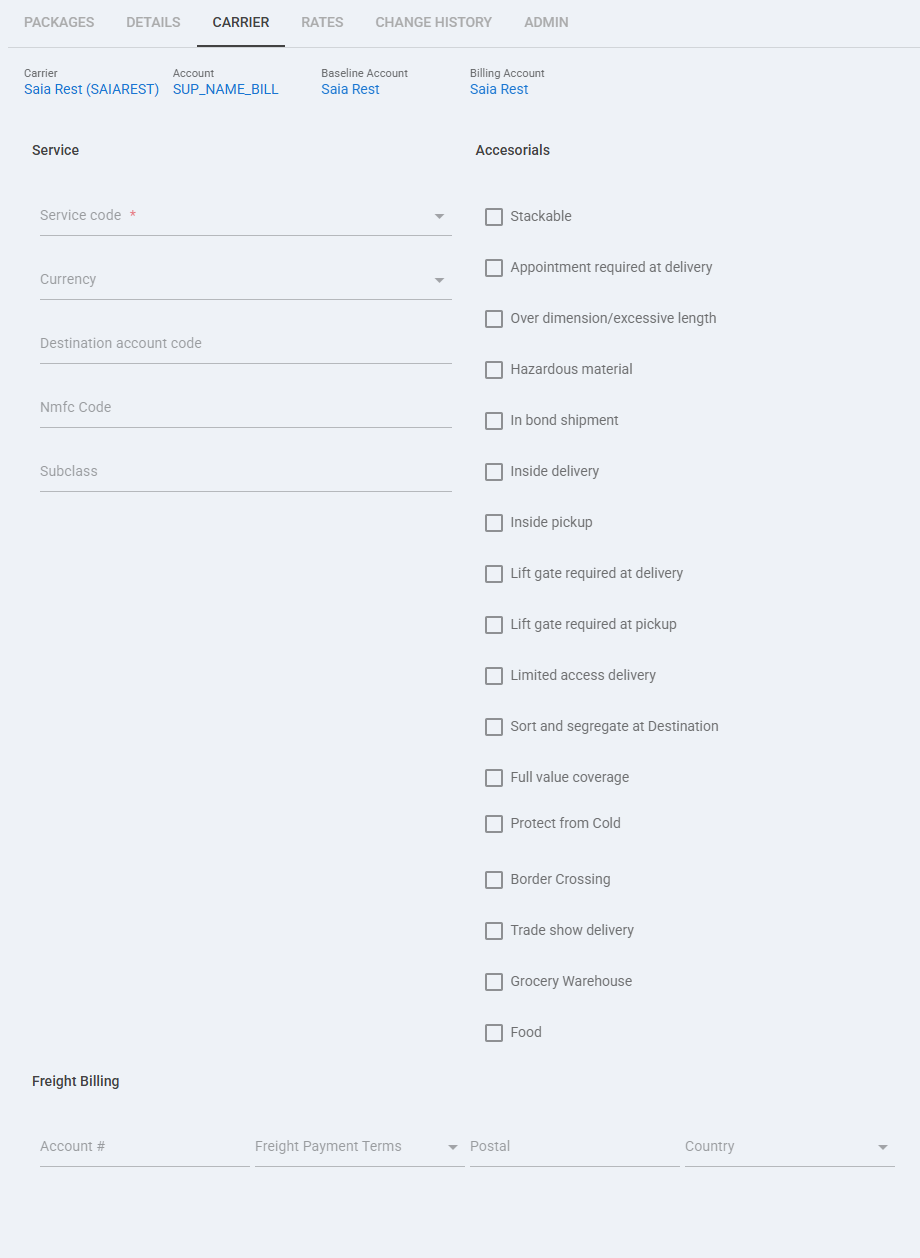
 | Service code: Select the service that should be applied to this order when a specific Saia REST service selection is required. |
 | Currency: Use this optional field only when the shipment requires a specific currency value. |
 | Destination account code: Use this field when the order must ship using a destination billing account, typically with Collect payment terms. |
 | Nmfc Code: Enter the NMFC code required for the freight commodity when it must be set at order level. |
 | Subclass: Use this field to provide the subclass value associated with the freight classification when required. |
 | Physical handling accessorials: Use these options to request shipment handling services such as Stackable, Over dimension / excessive length, Inside delivery, Inside pickup, Lift gate required at delivery, Lift gate required at pickup, and Limited access delivery. |
 | Special shipment accessorials: Use these options when the order requires special carrier handling, including Appointment required at delivery, Sort and segregate at Destination, Trade show delivery, and Grocery Warehouse. |
 | Regulatory and protected shipment options: Use these accessorials when required by the order, including Hazardous material, In bond shipment, Full value coverage, Protect from Cold, and Border Crossing. |
 | Food: Enable this option when the shipment must be processed as food. This option is used during shipment processing and is not included in rate requests. |
 | Freight Billing: Use the Account and Freight Payment Terms fields to define the billing method for this specific order. Order-level payment terms are used only when the Client (Billing) Account enables third-party billing order override; otherwise, the Billing Account payment settings apply. |
 | Postal / Country: Complete these Freight Billing fields when the payer address for the billing scenario requires postal and country values. |
 | To enable carrier-specific settings —and before continuing—, press Save. |
Next Steps
You can now ship this Order through Saia REST.