
This guide explains how to configure FedEx REST-specific settings in the Carrier tab of an Order.
Order-level carrier settings define transaction-specific behavior for the selected Order. These values apply only to that Order and may override or complement the default behavior configured in the related Client (Billing) Account.
 | For a complete overview of supported carriers and related setup guides, refer to techSHIP supported Carriers - Master List [Guides List]. |
TABLE OF CONTENTS
Prerequisites
Before configuring the Order's Carrier tab, ensure that:
A FedEx REST Client (Billing) Account has been created. See: How to Add a FedEx REST & IPD Client (Billing) Account [Guide].
Follow the configuration steps as described in: 05 - How to edit an order’s information - [Step-by-Step guide] using the values provided below.
Carrier-Specific Options
The Carrier tab contains the FedEx REST-specific options used to define behavior for the selected Order. Fields in this view are grouped visually to distinguish mandatory (red-highlighted items) and optional or conditional (blue-highlighted items) carrier-specific settings.
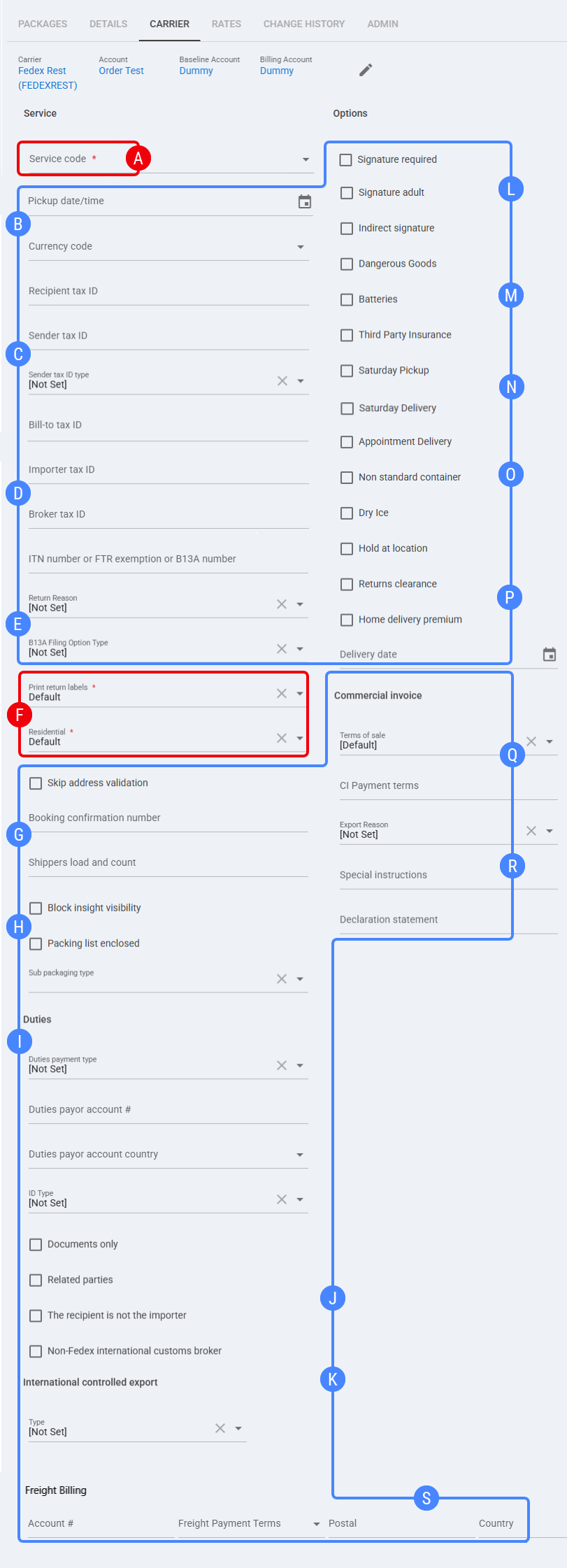
 | Service code: Select the FedEx service used for this Order. Example value shown: FedEx International Priority®. |
 | Pickup date/time: Select the pickup date and time for this Order, when required. Currency code: Select the currency used for this Order. Example value shown: USD. |
 | Recipient tax ID: Enter the recipient tax identifier when required for international or customs processing. Sender tax ID: Enter the sender tax identifier when required for international or customs processing. Sender tax ID type: Select the tax ID type associated with the Sender tax ID. Bill-to tax ID: Enter the bill-to tax identifier when required for customs or billing processing. |
 | Importer tax ID: Enter the importer tax identifier when required for international shipments. Broker tax ID: Enter the broker tax identifier when a broker is involved in customs processing. ITN number or FTR exemption or B13A number: Enter the international trade reference when required by the shipment type, destination, or export requirements. |
 | Return Reason: Select the return reason for this Order. Example value shown: [Not Set]. B13A Filing Option Type: Select the B13A filing option when applicable. Example value shown: [Not Set]. |
 | Print return labels: Select whether return labels are printed for this Order. Example value shown: Default. Residential: Select whether the destination is treated as residential for this Order. Example value shown: Disable. |
 | Skip address validation: Enable this option to skip address validation for this Order. Booking confirmation number (Express Freight Only): Enter the booking confirmation number for Express Freight shipments only. Shippers load and count: Enter the shipment handling value when required by the carrier or freight workflow. |
 | Block insight visibility: Enable this option to block visibility through FedEx Insight for this Order. Packing list enclosed: Enable this option when the packing list is enclosed with the shipment. Sub packaging type: Select the sub packaging type for the shipment. Example value shown: Box. |
 | Duties payment type: Select how duties are paid for this Order. Example value shown: [Not Set]. Duties payor account #: Enter the account number used when duties are paid by a specific payor. Duties payor account country: Select the country associated with the duties payor account. ID Type: Select the identification type used for duties or customs-related processing. Example value shown: [Not Set]. |
 | Documents only: Enable this option when the shipment contains documents only. Related parties: Enable this option when related parties are involved in the shipment. The recipient is not the importer: Enable this option when the shipment recipient is not the importer. Non-FedEx international customs broker: Enable this option when a non-FedEx customs broker is used for the international shipment. |
 | International controlled export - Type: Select the international controlled export type. Example value shown: [Not Set]. |
 | Signature required: Enable this option to request a signature for delivery. Signature adult: Enable this option to request an adult signature for delivery. Indirect signature: Enable this option to request an indirect signature for delivery. |
 | Dangerous Goods: Enable this option when the Order contains dangerous goods and the workflow is supported by the FedEx REST API. Batteries: Enable this option when the Order contains batteries. Third Party Insurance: Enable this option to use third-party insurance for this Order. |
 | Saturday Pickup: Enable this option to request Saturday pickup when supported by the selected service and account configuration. Saturday Delivery: Enable this option to request Saturday delivery when supported by the selected service and account configuration. |
 | Appointment Delivery: Enable this option to request appointment delivery when applicable. Non standard container: Enable this option when the shipment uses a non-standard container. Dry Ice: Enable this option when the Order contains dry ice. |
 | Hold at location: Enable this option to request hold-at-location handling for the shipment. Returns clearance: Enable this option to request returns clearance handling when applicable. Home delivery premium: Enable this option to apply home delivery premium handling when supported. Delivery date: Select the delivery date for this Order, when required by the selected service or delivery option. |
 | Terms of sale: Select the terms of sale used for the commercial invoice. Example value shown: DDP. CI Payment terms: Enter or select the commercial invoice payment terms, when required. |
 | Export Reason: Select the export reason for the shipment. Example value shown: [Not Set]. Special instructions: Enter special instructions for the commercial invoice or international shipment. Declaration statement: Enter the declaration statement used for international documentation when required. |
 | Freight Billing - Account #: Enter the freight billing account number used for this Order. Freight Payment Terms: Select the freight payment terms used for this Order. Postal: Enter the postal code associated with the freight billing information. Country: Select the country associated with the freight billing information. |
Next Steps
You can now ship this Order through FedEx REST.