
![Article 1: ConnectShip Onboarding Requirements and Configuration Guides [Information]](https://s3.amazonaws.com/cdn.freshdesk.com/data/helpdesk/attachments/production/96804813/original/7GJKyJXA3AM8E5itsPpDRjtqBPX6owOtKQ.png?1779474489) | ![Article 2: Reference Data: ConnectShip Baseline Account Fields [Guide]](https://s3.amazonaws.com/cdn.freshdesk.com/data/helpdesk/attachments/production/96805389/original/PESWYE3uLdtYfrTR6D8pmzemRjxuhc873g.png?1779476661) | ![Article 3: Reference Data: ConnectShip Client (Billing) Account Fields [Guide]](https://s3.amazonaws.com/cdn.freshdesk.com/data/helpdesk/attachments/production/96804742/original/bHFYZzIg1p3n6eidaRLAM0zP1uVKzHY4sw.png?1779473999) | ![Article 4: Reference Data: Order-Level ConnectShip Fields [Guide]](https://s3.amazonaws.com/cdn.freshdesk.com/data/helpdesk/attachments/production/96804746/original/nvzXhnphxceM2NVyNNdVUi_M73glJphvXw.png?1779474008) |
| Onboarding and Configuration | Baseline Account | (Billing) Account | Order-Level Fields |
 You are here You are here |
This reference lists the carrier-specific ConnectShip Baseline Account fields used in techSHIP configuration.
Use it together with the linked Baseline Account setup steps: the setup guide covers the shared configuration flow, while this article defines the confirmed field values, field behavior, and carrier-specific configuration details.
 |
ConnectShip is configured for approved internal use with Dynamite and Metro. This implementation is handled as Small Parcel and is associated with UPS 100Weight service use.
|
 | Review ConnectShip Onboarding Requirements and Configuration Guides [Information] before configuring the Baseline Account so credentials and account settings are confirmed. |
TABLE OF CONTENTS
Adding a Baseline Account
Follow the UI Navigation steps in How to Add a Carrier Baseline Account [Step-by-Step guide], using the carrier-specific values provided in this guide.
Go to  | |
 |  |
| Essential Configuration | Carrier-Specific |
Carrier-Specific Instructions
| Return to | |
 |  |
| Essential Configuration | Carrier-Specific |
Carrier Tab
The Carrier tab contains the Baseline Account fields used to identify the ConnectShip connection and define confirmed carrier-specific behavior.
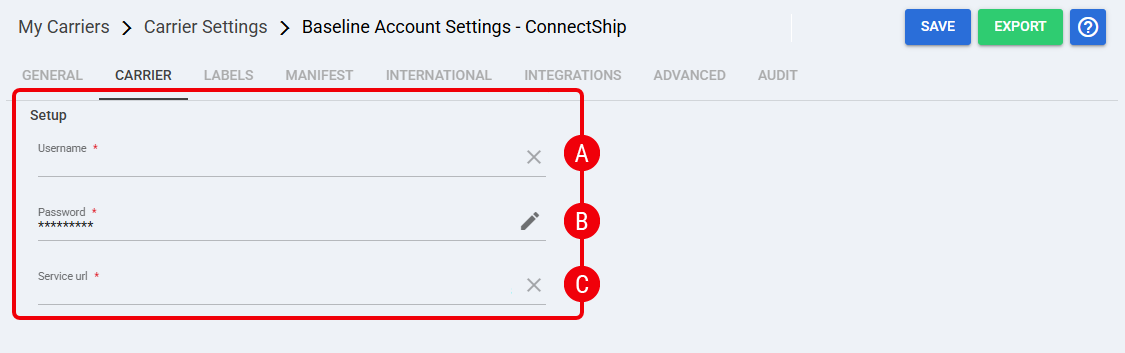 [Insert ConnectShip Baseline Carrier tab screenshot here]
 | Username: Credential used to authenticate the ConnectShip connection. Obtain the value from the approved ConnectShip credentials source. |
 | Password: Credential used with the Username to authenticate the ConnectShip connection. Obtain the value from the approved ConnectShip credentials source. |
 | Service URL: Credential used to define the ConnectShip service endpoint. Obtain the value from the approved ConnectShip credentials source. |
Labels Tab
Set Mode to one of the confirmed label formats supported for ConnectShip: ZPL, PDF, or PNG.
| Click Save before continuing so the configured settings are applied. |
Finalizing the Setup
Once the Baseline Account has been created, validated, and saved, continue with Reference Data: ConnectShip Client (Billing) Account Fields [Guide].
| Go to | |||
![Article 1: ConnectShip Onboarding Requirements and Configuration Guides [Information]](https://s3.amazonaws.com/cdn.freshdesk.com/data/helpdesk/attachments/production/96804995/original/8TBA5Gx5zMbNVuxpBfz-CdrCvI4APxv9oQ.png?1779475304) | ![Article 2: Reference Data: ConnectShip Baseline Account Fields [Guide]](https://s3.amazonaws.com/cdn.freshdesk.com/data/helpdesk/attachments/production/96805142/original/-hCPa73Oa_qPHu9q9vIfK7GGTavTCHKWGA.png?1779475839) | ![Article 3: Reference Data: ConnectShip Client (Billing) Account Fields [Guide]](https://s3.amazonaws.com/cdn.freshdesk.com/data/helpdesk/attachments/production/96805392/original/fyeDiUtUuUfVRqUZR2oaGfPZOvJQgQ0sOg.png?1779476668) | |
| Onboarding and Configuration | Baseline Account | (Billing) Account | Order-Level Fields |