
![Article 1: Whistl Onboarding Requirements and Configuration Guides [Information]](https://s3.amazonaws.com/cdn.freshdesk.com/data/helpdesk/attachments/production/96804820/original/pQ_PTMs9GFD5Wpgr5rkepgZm7weklFsmZA.png?1779474515) | ![Article 2: Reference Data: Whistl Baseline Account Fields [Guide]](https://s3.amazonaws.com/cdn.freshdesk.com/data/helpdesk/attachments/production/96804740/original/A-sKSzmZ_Vj4x4q6VoUBEk-gtdTDnv2kuQ.png?1779473989) | ![Article 3: Reference Data: Whistl Client (Billing) Account Fields [Guide]](https://s3.amazonaws.com/cdn.freshdesk.com/data/helpdesk/attachments/production/96804742/original/bHFYZzIg1p3n6eidaRLAM0zP1uVKzHY4sw.png?1779473999) | ![Article 4: Reference Data: Order-Level Whistl Fields [Guide]](https://s3.amazonaws.com/cdn.freshdesk.com/data/helpdesk/attachments/production/96804821/original/Jl5CA0KZwUmUI12R4nAd9jR2_RRmxSNI0A.png?1779474519) |
| Onboarding and Configuration | Baseline Account | (Billing) Account | Order-Level Fields |
 You are here You are here |
This reference lists the carrier-specific Order-Level Whistl fields.
Use it together with the linked How to Edit an Order's Information article: the setup guide covers the shared order-editing flow, while this article defines the confirmed field values, field behavior, and carrier-specific configuration details available at the order level.
They apply only to the selected Order and may affect how that specific shipment is processed.
 |
This step is not required for carrier setup. For a complete overview of supported carriers and related setup guides, refer to techSHIP supported Carriers - Master List [Guides List].
|
 | Review and complete Reference Data: Whistl Client (Billing) Account Fields [Guide] before processing orders with Whistl so shipments use the required client billing configuration. |
TABLE OF CONTENTS
Editing an Order
Follow the UI Navigation steps in How to Edit an Order [Step-by-Step guide], using the carrier-specific values provided in this guide.
Go to  | |
 |  |
| Essential Configuration | Carrier-Specific You are here You are here |
Carrier-Specific Options
| Return to | |
 |  |
| Essential Configuration | Carrier-Specific |
The Carrier tab contains the carrier-specific fields available when editing an Order. These fields define confirmed order-level shipment behavior for the selected shipment. Red icons identify required fields, and blue icons identify fields not marked as required.
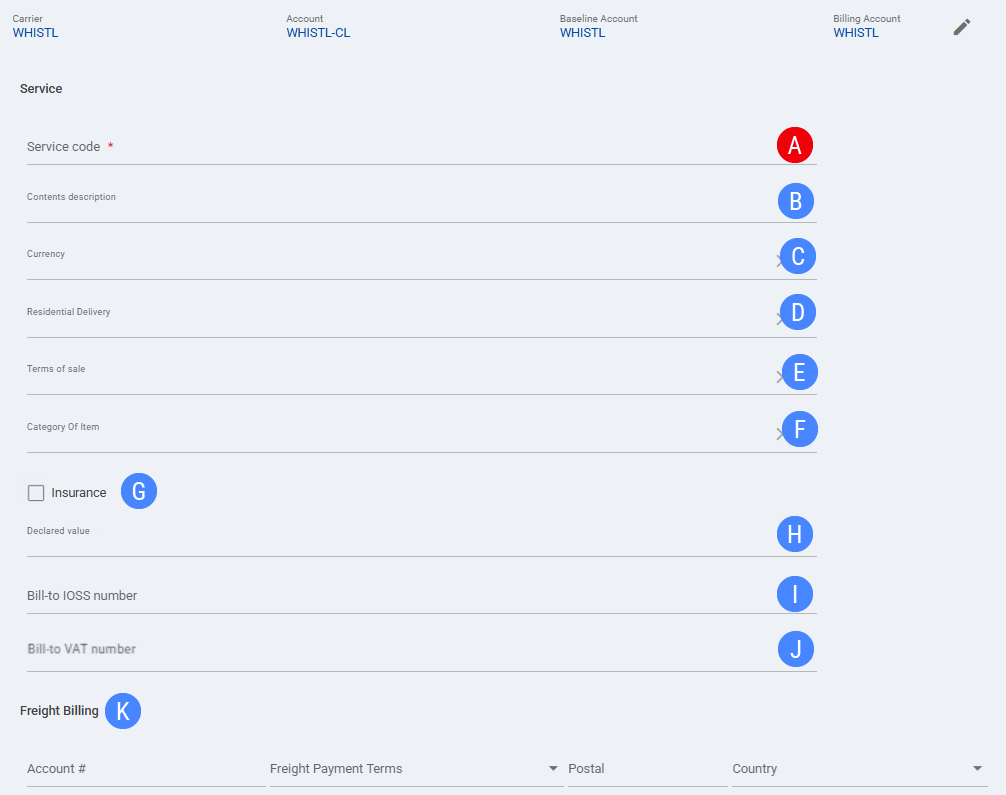
 | Service code: Defines the Whistl service used for the selected Order. |
 | Contents description: Defines the shipment contents description used for the selected Order. |
 | Currency: Defines the currency used for order-level shipment values. |
 | Residential Delivery: Identifies the destination as a residential delivery for the selected Order. |
 | Terms of sale: Defines the terms of sale value used when shipment or customs data requires it. |
 | Category Of Item: Defines the item category value used when category information is required for the shipment. |
 | Insurance: Defines whether insurance is requested for the selected Order. |
 | Declared value: Defines the declared value used for the selected Order. |
 | Bill-to IOSS number: Defines the bill-to IOSS number used when IOSS information applies to the selected Order. |
 | Bill-to VAT number: Defines the bill-to VAT number used when VAT information applies to the selected Order. |
 | Freight Billing: Defines order-level freight billing details, including Account #, Freight Payment Terms, Postal, and Country. |
| Select Save before continuing so the configured order-level settings are applied. |
Next Steps
After the Order is updated and saved, continue with the standard shipping workflow.