
![Article 1: Whistl Onboarding Requirements and Configuration Guides [Information]](https://s3.amazonaws.com/cdn.freshdesk.com/data/helpdesk/attachments/production/96804815/original/09VBUo14zVrZ7P3XOYSoWXIqqrVjGFCUUQ.png?1779474501) | ![Article 2: Reference Data: Whistl Baseline Account Fields [Guide]](https://s3.amazonaws.com/cdn.freshdesk.com/data/helpdesk/attachments/production/96804740/original/A-sKSzmZ_Vj4x4q6VoUBEk-gtdTDnv2kuQ.png?1779473989) | ![Article 3: Reference Data: Whistl Client (Billing) Account Fields [Guide]](https://s3.amazonaws.com/cdn.freshdesk.com/data/helpdesk/attachments/production/96805395/original/_J10u70kSFBTHPSpib4jtXfeu4C3mm54wg.png?1779476680) | ![Article 4: Reference Data: Order-Level Whistl Fields [Guide]](https://s3.amazonaws.com/cdn.freshdesk.com/data/helpdesk/attachments/production/96804746/original/nvzXhnphxceM2NVyNNdVUi_M73glJphvXw.png?1779474008) |
| Onboarding and Configuration | Baseline Account | (Billing) Account | Order-Level Fields |
 You are here You are here |
This reference lists the carrier-specific Whistl Client (Billing) Account fields used in techSHIP.
Use it together with the linked Client (Billing) Account setup steps: the setup guide covers the shared configuration flow, while this article defines the confirmed field values, field behavior, and client-specific carrier configuration details.
 |
For a complete overview of supported carriers and related setup guides, refer to techSHIP supported Carriers - Master List [Guides List].
|
 | Review and complete Reference Data: Whistl Baseline Account Fields [Guide] before configuring the Client (Billing) Account so the carrier connection is available. |
TABLE OF CONTENTS
Adding a Client (Billing) Account
Follow the UI Navigation steps in How to Add a Carrier Billing Account [Step-by-Step guide], using the carrier-specific values provided in this guide.
Go to  | |
 |  |
| Essential Configuration | Carrier-Specific You are here You are here |
Carrier-Specific Instructions
| Return to | |
 |  |
| Essential Configuration | Carrier-Specific |
The Carrier tab contains the Client (Billing) Account fields used to define the Whistl service selection, shipment value defaults, and confirmed client-specific carrier configuration details. Red icons identify required fields, and blue icons identify fields not marked as required.
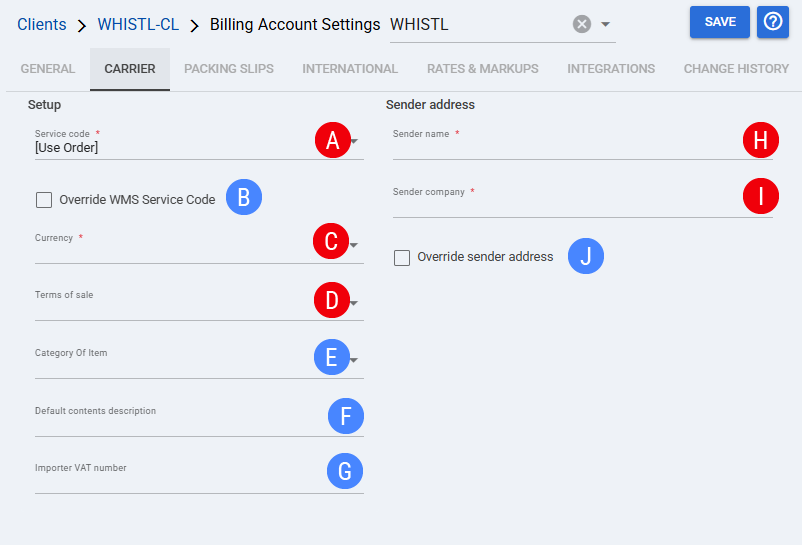
 | Service code: Defines the Whistl service used by the Client (Billing) Account. Select [Use Order] to use the service selected at order level. |
 | Override WMS Service Code: Controls whether shipments use the configured Service code instead of the service code received from the integrated system. |
 | Currency: Defines the currency used for shipment value data processed through this Client (Billing) Account. |
 | Terms of sale: Defines the terms of sale value used when shipment or customs data requires it. |
 | Category Of Item: Defines the item category value used when category information is required for the shipment. |
 | Default contents description: Defines the default contents description used when shipment contents information is not otherwise provided. |
 | Importer VAT number: Defines the importer VAT number used for shipments where importer VAT information applies. |
 | Sender name: Defines the sender contact name used for this Client (Billing) Account. |
 | Sender company: Defines the sender company name used for this Client (Billing) Account. |
 | Override sender address: Controls whether shipments use the sender address configured for this Client (Billing) Account instead of the sender address inherited from the carrier connection. |
| Select Save before continuing so the configured settings are applied. |
Next Steps (Optional)
Optionally, after the Client (Billing) Account is configured and saved, continue with Reference Data: Order-Level Whistl Fields [Guide].
| Go to | |||
![Article 1: Whistl Onboarding Requirements and Configuration Guides [Information]](https://s3.amazonaws.com/cdn.freshdesk.com/data/helpdesk/attachments/production/96804995/original/8TBA5Gx5zMbNVuxpBfz-CdrCvI4APxv9oQ.png?1779475304) | ![Article 2: Reference Data: Whistl Baseline Account Fields [Guide]](https://s3.amazonaws.com/cdn.freshdesk.com/data/helpdesk/attachments/production/96805147/original/W85CGdQ10tusn215or-ihmIcZ_i6NOpE0Q.png?1779475851) | ![Article 3: Reference Data: Whistl Client (Billing) Account Fields [Guide]](https://s3.amazonaws.com/cdn.freshdesk.com/data/helpdesk/attachments/production/96804742/original/bHFYZzIg1p3n6eidaRLAM0zP1uVKzHY4sw.png?1779473999) | ![Article 4: Reference Data: Order-Level Whistl Fields [Guide]](https://s3.amazonaws.com/cdn.freshdesk.com/data/helpdesk/attachments/production/96805154/original/MvAruYrqddY9APYfmYwhgPq_Kv9BGaToBA.png?1779475858) |
| Onboarding and Configuration | Baseline Account | (Billing) Account | Order-Level Fields |