
![Article 1: Veeqo Onboarding Requirements and Configuration Guides [Information]](https://s3.amazonaws.com/cdn.freshdesk.com/data/helpdesk/attachments/production/96804820/original/pQ_PTMs9GFD5Wpgr5rkepgZm7weklFsmZA.png?1779474515) | ![Article 2: Reference Data: Veeqo Baseline Account Fields [Guide]](https://s3.amazonaws.com/cdn.freshdesk.com/data/helpdesk/attachments/production/96804740/original/A-sKSzmZ_Vj4x4q6VoUBEk-gtdTDnv2kuQ.png?1779473989) | ![Article 3: Reference Data: Veeqo Client (Billing) Account Fields [Guide]](https://s3.amazonaws.com/cdn.freshdesk.com/data/helpdesk/attachments/production/96804742/original/bHFYZzIg1p3n6eidaRLAM0zP1uVKzHY4sw.png?1779473999) | ![Article 4: Reference Data: Order-Level Veeqo Fields [Guide]](https://s3.amazonaws.com/cdn.freshdesk.com/data/helpdesk/attachments/production/96804821/original/Jl5CA0KZwUmUI12R4nAd9jR2_RRmxSNI0A.png?1779474519) |
| Onboarding and Configuration | Baseline Account | (Billing) Account | Order-Level Fields |
 You are here You are here |
This reference lists the carrier-specific Order-Level Veeqo fields.
Use it together with the linked How to Edit an Order's Information article: the setup guide covers the shared order-editing flow, while this article defines the confirmed field values, field behavior, and carrier-specific configuration details available at the order level.
They apply only to the selected Order and may affect how that specific shipment is processed.
 |
This step is not required for carrier setup. For a complete overview of supported carriers and related setup guides, refer to techSHIP supported Carriers - Master List [Guides List].
|
 | Review and complete Reference Data: Veeqo Client (Billing) Account Fields [Guide] before processing orders with Veeqo so shipments use the required client billing configuration. |
TABLE OF CONTENTS
Editing an Order
Follow the UI Navigation steps in How to Edit an Order [Step-by-Step guide], using the carrier-specific values provided in this guide.
Go to  | |
 |  |
| Essential Configuration | Carrier-Specific This article |
Carrier-Specific Options
| Return to | |
 |  |
| Essential Configuration | Carrier-Specific |
Carrier Tab
The Carrier tab contains the carrier-specific fields available when editing an Order. These fields define confirmed order-level behavior for the selected shipment. Highlighted fields indicate mandatory and optional configuration groups.
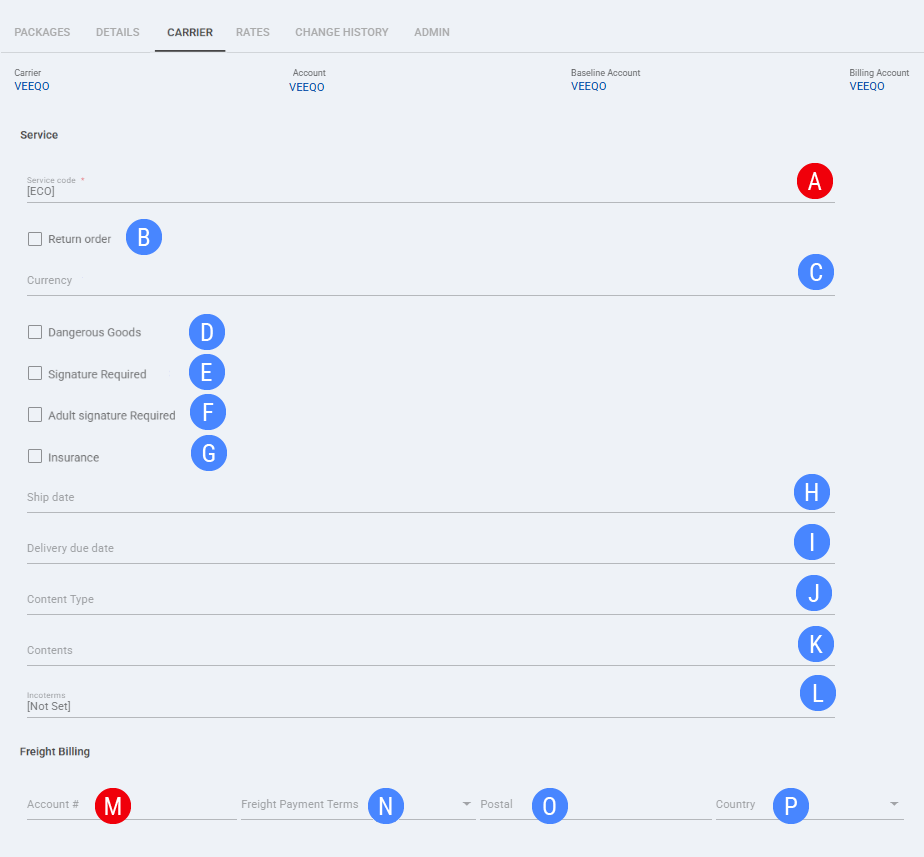
 | Service code: Select the service code used when processing the selected Order with Veeqo. The selected value defines the service option for that shipment. |
 | Return order: Marks the selected Order as a return shipment when return processing applies. |
 | Currency: Sets the currency value used for order-level shipment values when required for processing. |
 | Dangerous Goods: Sets the order-level dangerous goods indicator when this value is used for the selected shipment. |
 | Signature Required: Sets the order-level signature requirement indicator when this value is used for the selected shipment. |
 | Delivery Confirmation: Sets the order-level delivery confirmation value when this value is used for the selected shipment. |
 | Insurance: Sets the order-level insurance value when this value is used for the selected shipment. |
 | Ship date: Sets the shipment date used for the selected Order when a ship date is provided at order level. |
 | Delivery due date: Sets the delivery due date used for the selected Order when a delivery due date is provided at order level. |
 | Content Type: Defines the order-level content type used for shipment processing when this value is provided. |
 | Contents: Defines the order-level contents description used for shipment processing when this value is provided. |
 | Incoterms: Sets the order-level Incoterms value used for shipment processing when this value is provided. |
 | Account #: Sets the freight billing account number for the selected Order when freight billing details are provided at order level. |
 | Freight Payment Terms: Sets the freight payment terms for the selected Order when freight billing details are provided at order level. |
 | Postal: Sets the postal code associated with the order-level freight billing details when provided. |
 | Country: Sets the country associated with the order-level freight billing details when provided. |
| Select Save before continuing so the configured order-level settings are applied. |
Next Steps
After the Order is updated and saved, continue with the standard shipping workflow.