
This guide explains how to migrate an existing FedEx REST Baseline Account from customer-owned API credentials to credentials provided through the Techdinamics FedEx Integrator Program.
 |
The migration updates only the account authentication credentials. Existing Orders, shipping workflows, labels, and carrier functionality remain unchanged.
|
TABLE OF CONTENTS
Prerequisites
Before starting the migration, ensure that:
- The existing FedEx REST Baseline Account uses customer-owned API credentials.
- You have the account information required to complete FedEx registration, address validation, and authentication. See FedEx REST Onboarding Requirements and Configuration Guides [Information].
Migration Instructions
To migrate the account:
 | From the main navigation menu, go to Carriers → My Carriers. |
 | Locate the FedEx REST Baseline Account and click Edit. |
 | Select the Carrier tab. |
 | Optionally, export the Baseline Account to keep a backup of its current configuration. |
 | Clear the Own API key checkbox, then clear the values from User key and User password. |
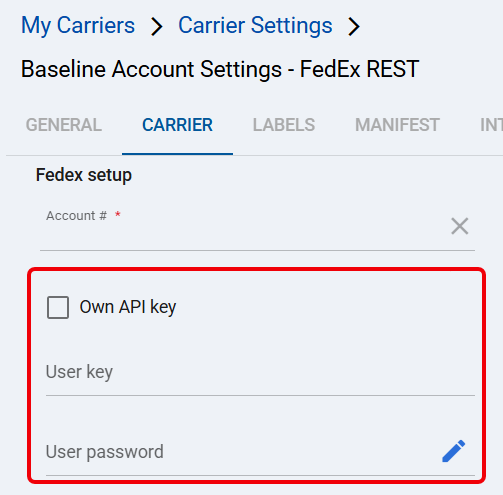
 | Click Save. |
 | Complete the FedEx registration and authentication workflow in How to Add a FedEx REST Baseline Account [Guide] → FedEx Registration and Authentication. After validation, confirm that techSHIP populated User key and User password, then click Save. |
The FedEx REST Baseline Account now uses the Techdinamics FedEx Integrator Program credentials.