
Custom Lists can help you manage carrier serviceability when a Carrier only serves specific destination postal codes. By referencing a reusable list from an Order Management Rule (OMR), you can evaluate destination coverage and automatically assign a fallback Carrier Service when an order falls outside the supported area.
This guide covers how to combine Carrier code and Postal conditions, choose between the in list and not in list operators, and configure a fallback Carrier Service in techSHIP.
 | Before configuring the carrier-serviceability rule, make sure you are familiar with creating and configuring an OMR Rule Set. For instructions, refer to What's New in Order Management Rules (OMR) for Rule Sets in techSHIP [Guide]. For detailed conceptual information and advanced configuration, refer to Understanding Custom Lists [Information]. | |
| | ||
TABLE OF CONTENTS
Understanding Carrier Serviceability Logic
A common carrier-serviceability scenario starts with a Custom List containing the postal codes that a regional Carrier supports. You can then evaluate the order's Postal value against that list before deciding whether to keep the current routing or assign a fallback Carrier Service.
For this scenario, the list operator you choose depends on what the Custom List represents:
- not in list: Use this operator when your Custom List contains the postal codes the Carrier can serve. The condition matches when the destination Postal is outside that coverage area.
- in list: Use this operator when your Custom List contains postal codes that should trigger an alternate routing decision, such as destinations where a particular Carrier should not be used.
To limit the routing change to orders already assigned to a specific Carrier, combine the Postal condition with a Carrier code condition using AND logic.
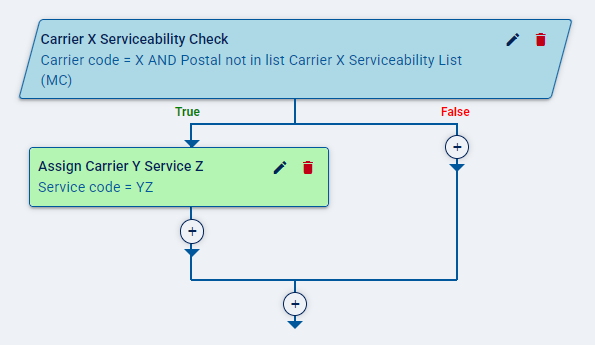
For example, you can configure the rule to evaluate whether the Carrier code identifies a regional Carrier and whether the Postal value is not included in that Carrier's serviceability list. When both conditions evaluate as True, the rule can assign a Service code associated with another Carrier.
| To review the condition fields available in OMR, refer to Order Management Rules (OMR) Available Conditions [Information]. | |
| | ||
Configuring Carrier Serviceability
Before configuring the carrier-serviceability rule, make sure the Custom List containing your postal codes is already available. To learn how to create a Custom List, see: Create and Manage Custom Lists [Step-by-Step Guide].
Configure the Carrier Condition
Add a Condition that limits the rule to orders currently assigned to the Carrier whose serviceability you want to evaluate.
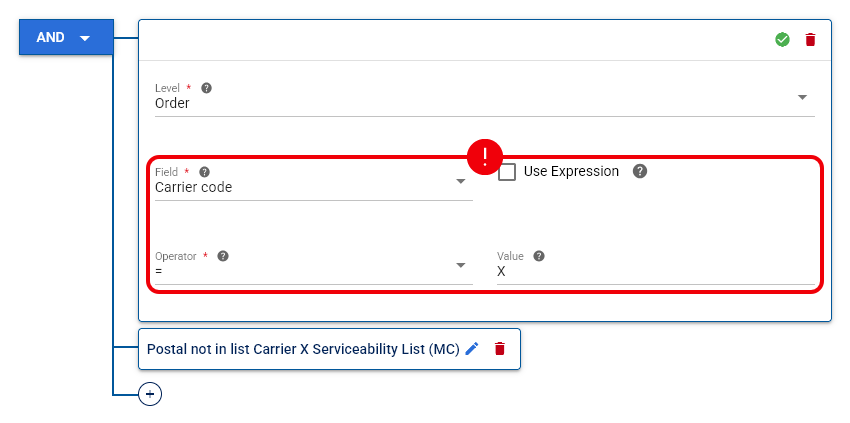
Configure the Carrier condition with the following values:
- Field: Select Carrier code.
- Operator: Select =.
- Value: Select or enter the Carrier code you want the rule to evaluate.
This condition ensures that the serviceability check only affects orders assigned to the selected Carrier.
Configure the Postal Condition
Add another Condition and combine it with the Carrier condition using AND logic.
Configure the Postal condition as follows:
- Field: Select Postal.
- Operator: Select not in list when the Custom List contains postal codes serviced by the Carrier. Select in list instead when membership in the list should trigger the fallback behavior.
- List: Select the Custom List containing the postal codes you want to evaluate.
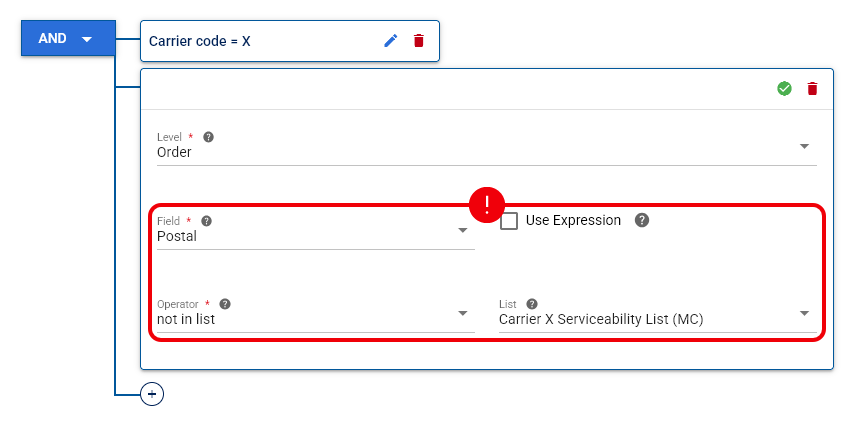
With not in list, the Postal condition matches when the order's destination postal code is not contained in the selected serviceability list.
Configure the Fallback Carrier Service
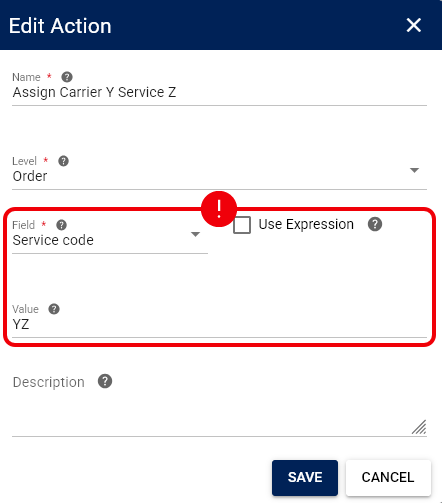
On the True branch, configure an Action that assigns the Service provided by the fallback Carrier.
Set Service code to the code of the fallback Carrier Service that should process destinations outside the original Carrier's service area.
Once the Rule Set is saved and applicable, techSHIP evaluates the Carrier and Postal conditions and applies the configured Service code when the condition evaluates as True.